
3.2.7 Slice

When clicking the "Top Toolbar -> Data Slicing" button, the "Data Slicing" function panel will automatically pop up on the left side. The slicing function primarily involves model layering, resin profile binding, and other related operations. Only after the slicing process is completed and the file is exported in the proprietary RS format can it be received and recognized by the printer.
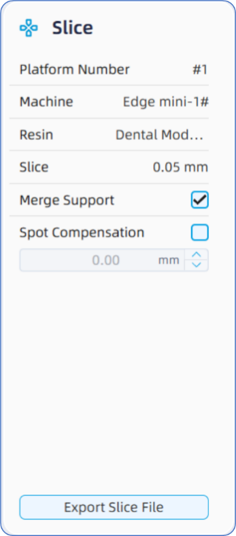
Before proceeding with "Process Planning -> Data Slicing", users need to re-verify the essential printing information, including "Platform ID", "Device", "Material", "Layer thickness", "Merge Supports", and "Spot Compensation".
· Platform ID: Refers to the ID of the current active build platform. Since the software supports multi-platform parallel operations, users must verify whether the file to be sliced belongs to the designated platform before slicing.
· Device: Refers to the current equipment model. Users must verify whether this matches the actual printer model and build platform specifications .
· Material: Refers to the currently selected material type. Users must carefully verify this setting to prevent print failures or quality degradation caused by selecting the wrong material.
- Layer Thickness: Refers to the designated printing thickness for each individual layer.
- Merge Supports: If this option is enabled, the solid and supports within a single-layer print image will share identical exposure mechanisms and parameters. If unchecked, the supports and the model solid will be assigned separate exposure profiles and parameter configurations respectively.
- Spot Compensation: If this option is enabled, the software will apply a corresponding offset to the outer contours of each single-layer slice image, with a compensation range of -0.1 to 0.1 mm. Please note that the specific value for spot compensation must be verified and defined only after practical print testing and dimensional measurement.
After verifying that the printing settings, click the "Export Slice" button, and the software will automatically execute the layered slicing and file generation process.